Mark your calendars, Regional ePermitting Training/User Conferences are coming this Fall and Spring!Our first two conferences will be:
Nov. 13 - 14 from 8:30 a.m. - 3:30 p.m., hosted by the City of Happy Valley Dec. 4 - 5 from 8:30 a.m. - 3:30 p.m., hosted by the City of Astoria We will also schedule conferences in Eastern Oregon and Southern/Central Oregon this coming Spring. Training and discussion topics include: “My Filters,” Creating Custom Filters locally, basic Ad-Hoc Reporting, processing Refunds and other Financial Transactions, Workflow, Advanced Tips and Tricks, and an open Question and Answer Session to get the answers you’ve always wanted to know. For more information and how to register, visit the 'Conferences/training' page.
0 Comments
The code edition dropdowns for residential mechanical and commercial structural record types were updated Oct. 1, including defaulting those values to ‘2019’.
We announced a new Oregon Inspector App coming soon. We are continuing to work with our app developer on this project but they have run into technical issues. We hope that this new app will be available for download by the end of the year. An announcement will be sent out as soon as it is ready to use. Stay tuned!
The following workflow enhancements will go live in production on Tuesday, September 3rd:
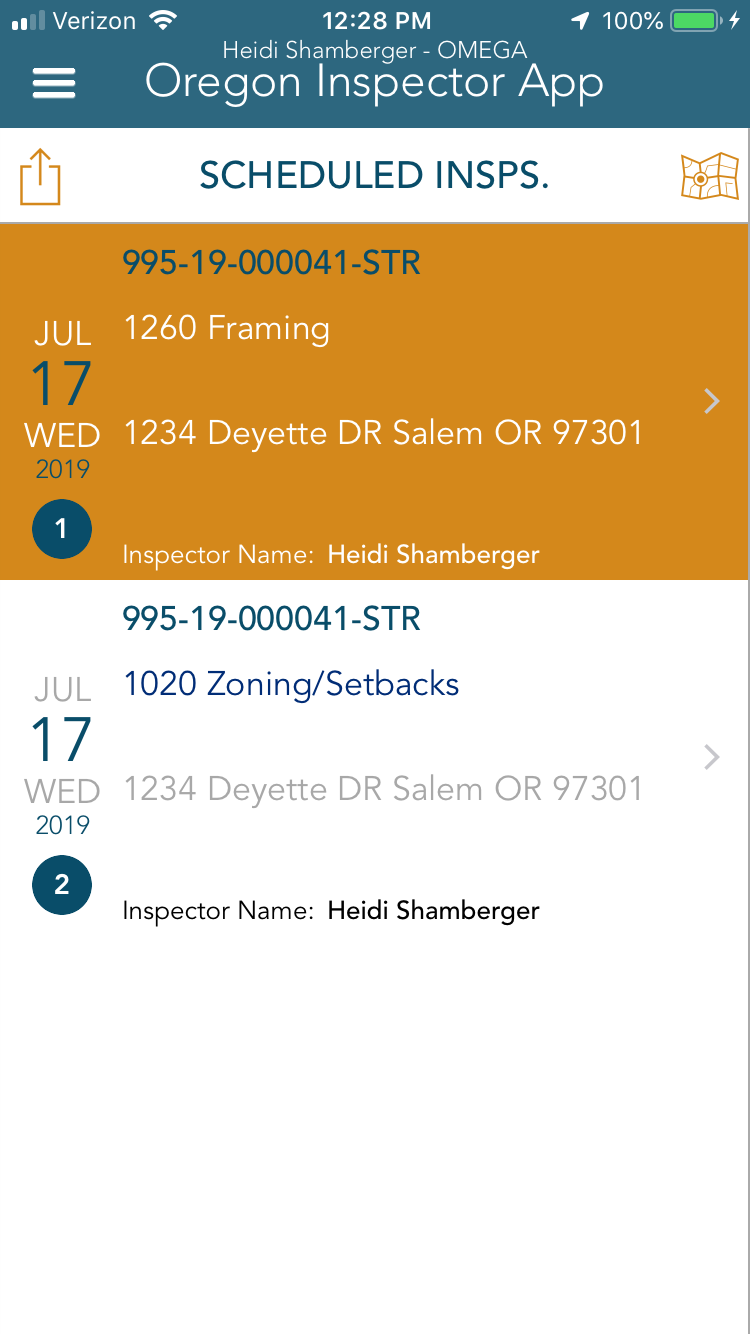
The ePermitting Program is working with an CityGovApps to create our own Oregon Inspector App. Our goal is to create an alternative to the current Accela Inspector App to allow for Oregon customization, faster bug fixes, and better support. The Accela app will still be available, but you will also have the choice to use the Oregon Inspector App. The Oregon Inspector App is similar in functionality to the Accela Inspector App, so the learning curve should not be too great. We are aiming to have the Oregon Inspector App available to download in early Fall 2019. The app will only be available for iOS devices at this time. There is a new feature that we are especially excited about: with the new app, an inspector can take pictures at the job site and add comments. Then the pictures can be added to the Result Report and emailed directly to the customer.
We announced in the last ePermitting Newsletter that we are working on a project to standardize the financial batch export that many of our agencies receive on a daily basis. We are continuing our progress but the project timeline has been extended due to some technical limitations that we are trying to overcome. We will provide another update with go-live dates and new Q & A session dates as soon as those are solidified.
On May 13, 2019 Grant County went live as an OSM Full Services agency. Grant County previously tracked their legacy data on a spreadsheet that was converted into Accela. They are using the Building and Planning modules in Accela and soon will offer Onsite. Welcome Grant County!
We have revised the inspection brochure with available inspection types, the brochure is available in both English an Spanish.
English: https://www.oregon.gov/BCD/epermitting/Documents/brochures/osm-inspection-codes.pdf Spanish: https://www.oregon.gov/BCD/epermitting/Documents/brochures/osm-inspection-codes-spanish.pdf As your business grows in ePermitting, we have begun receiving more requests for additional Contact Types. When you create a new contact, you are required to assign the contact a ‘role’ in the form of a Contact Type. We have recently approved requests to add the following types: Complainant, Property Manager, Tenant, Bank, Attorney, and Trustee (yellow highlighted values in the image below). Contacts are considered Reference Data your agency manually creates that are then associated with incoming applications - we at ePermitting want to assure you have the basic Contact Types needed to assign to your Contacts as you create them. 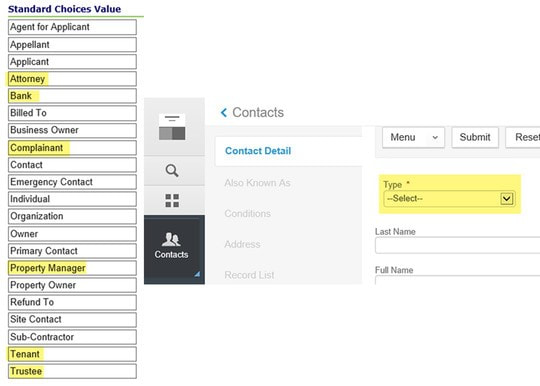 Note: This list cannot be exhaustive, so we will be taking the most requested types submitted thru this survey process. Follow the link to complete the survey: http://dcbs.az1.qualtrics.com/jfe/form/SV_3dzEoA1R9ONVhjv.
The ePermitting Program is working on a project to standardize the financial export process for all OSM agencies. The daily export file will also be generated a little bit differently behind the scenes to make maintenance and upgrades more streamlined for our team. But most importantly, we are standardizing the Payment Methods that will be included and excluded in each daily export. The following Payment Methods will now be included in the daily export:
Since this is potentially a big change for our agencies, we will be providing four Q & A sessions moderated by Kelly Marshall and Chrissie Deibel where you can ask questions after the testing phase but before moving to Production:
We will be rolling out fee update testing requests soon.
Thank you! If you have any questions regarding fee updates, please contact our helpdesk at epermitshelp.BCD@oregon.gov. We will be enabling online payments through Citizen Access for the Planning module on July 1, 2019. We understand that some agencies do not want to accept online payments for Planning so we have developed a method for blocking online payments for those agencies who choose not to. Click here to see the process from the perspective of a Public User when agencies opt out of accepting online payments.
The Prod to Staging refresh was completed by Accela. You can now log into the Staging environment and see records from Production as new as 3/27/2019.
Note: Jackson County and Lane County were both excluded from the refresh. As mentioned in the January 2019 ePermitting Newsletter, we’ve made some changes to the inspection types available in ePermitting.
We’ve heard for a number of years that there are too many inspections types which can make it confusing for contactors and homeowners when choosing inspections to be scheduled. We worked with several building officials as well as the technical experts here at the Building Codes Division to:
In addition to making changes to inspections available for scheduling, we will be making updates to existing scheduled and/or pending inspections (remapping the retired inspections). This is necessary to keep the apps working properly and to preserve functionality in the OSM agencies for re-adding pending inspections for failed instances. Existing inspections will be updated according to the following criteria:
For some OSM agencies, these changes may affect which inspections you have automatically pended at record creation. Following the 13th, if you’d like to review which inspections you have auto-pended for possible changes, please submit a ticket to the help desk via ePermitsHelp.BCD@oregon.gov. Due to the consolidation (we retired 160 inspection types) and remapping of inspections, you may find duplicates of pending and/or scheduled inspections. For example, 1118 Footing Drain and 1128 Foundation Waterproofing became 1124 Foundation Drain/Waterproofing. It’s possible that, if you had both 1118 Footing Drain and 1128 Foundation Waterproofing pended and/or scheduled, you might now see two instances (because both inspection types were mapped to 1124 Foundation Drain/Waterproofing). You can simply delete one of the instances (as appropriate). If you run into any difficulty and need more information for those inspections, you may request a spreadsheet of changes via the help desk. Click here to find a PDF that details which inspections are being retired and which inspection type they will be mapped to, according to the criteria above. There is also a PDF with the new inspection types. You can find an updated version of the inspection brochure here. For OSM agencies: Because only pended/scheduled inspections on active records were updated, if you reinstate a record, you will need to delete any pending and/or scheduled inspections and re-add the appropriate inspections. If you don’t do this, the scripting that adds a new instance upon a failed inspection, may not work properly. As a reminder for those agencies that do their own administration within Accela, inspection types must match throughout all ePermitting agencies so that IVR and the apps will work. If you’d like to make changes to inspections please submit a help desk ticket. The State of Oregon ePermitting is proud to announce the launch of SelecTXT, a new service allowing contractors and homeowners to utilize interactive text messaging to:
We are currently working with a couple of agencies as ground users to try this new service out and see how they like it and soon it will be available to all agencies. An end-user brochure is available for your lobbies, to provide with issued plans, or to hand out to your contractors along with an informational/instructions document for agencies. It’s that time of year again! If your agency is in the process of any fee updates for the fiscal year – we are asking that you please work to get them submitted by Wednesday, May 1st. Due to the sheer volume of agencies updating at the fiscal year (July 1st) and other projects that are currently in progress, turnaround time on all the changes to include testing, could take up to several weeks.
Please note that your fee updates do not have to be all the way through the approval process or have completed BCD Notice, so we ask that you send the draft of your fees that is currently under review/in process. We can get all the changes drafted and then only have to make minor changes as needed upon approval. If you wait to submit your fee updates, we may not be able to guarantee their availability in production for July 1. Thank you! If you have any questions regarding fee updates, please contact our helpdesk at epermitshelp.BCD@oregon.gov. The February 2019 ICC Building Valuation Data has been loaded into Accela for all agencies and was effective and available for use on April 1, 2019.
By early Spring 2019, we will be unrolling a remodel of the inspection types available in ePermitting. We have heard for a number of years that there are too many inspection types and that this can make it confusing for contractors and homeowners when they choose the inspections that they need to schedule. We worked with several building officials (thank you!!), as well as the technical experts here at the Building Codes Division, to:
We were hoping to roll this out by January 1st, but it has turned out to be more technically challenging than anticipated (we have to map all of the existing pended inspections to the appropriate new inspection types). We now anticipate these changes will go live just in time for Spring! At the November 29th Electrical and Elevator Board meeting, industry stakeholders appeared before the board and informed the board that jurisdictions may not be calculating permit fees for multi-family residences consistently.
The board was asked to clarify whether or not the installation of services feeding multi-family dwelling units should incur a separate fee in addition to the fee calculated under Oregon Administrative Rule (OAR) 918-309-0030(5)(b). After discussion, the board reaffirmed that under OAR 918-309-0030(4)(b) and (5)(b) the installation of services feeding multi-family residential units is included in the fee calculated under OAR 918-309-0030(5)(b) and jurisdictions should not be charging an additional or increased permit fee for the installation of services. This clarification applies to all jurisdictions in Oregon pursuant to OAR 918-050-0120 Statewide Fee Methodologies for Electrical Permits. Permit fees are required to be calculated consistently by each jurisdiction following methodologies approved by the board and laid out in OAR 918-309-0020 to 918-309-0070. The board’s clarification applies only to services installed on multi-family residential buildings that provide power to the residential units. It would not, for example, apply to services installed on the commercial portion of a mixed use building that contains both commercial and residential units or to services and circuits installed for general use applications. The State of Oregon ePermitting is proud to announce the launch of SelecTXT, a new service allowing contractors and homeowners to utilize interactive text messaging to:
Our IVR vendor Selectron has developed this new solution that simply uses your existing cellular text messaging functionality for scheduling inspections. It’s easy and fast, and better yet, does not require installation of an app, keeping an app up to date, or any other add-ons. With one word, users can begin the inspection scheduling process and SelecTXT will guide them from there. Helpful hints will ask them for their IVR tracking number and inspection code to complete the process in just a few key strokes. The commands are simple to remember and intuitive. It also offers “Express Commands” where users can complete the scheduling process with one single text message making it one of the fastest ways to schedule inspections offered. We are currently working with a couple of agencies as ground users to try this new service out and see how they like it. We are scheduled to make it available to all ePermitting agencies in early February. An end-user brochure for your lobbies, to provide with issued plans, or to hand out to your contractors will be made available along with an informational/instructions document for agencies. Stay tuned for the upcoming release date!! We plan on upgrading to version 10 in the Spring/Summer of 2019, once the new issues have been resolved and it is more stable.
When we went live with Accela in Azure we also upgraded our IVR with our vendor, Selectron. Please see below for important information related to IVR and this upgrade:
IVR PINs One primary change related to this upgrade was the discontinued use of the IVR User ID – this is no longer required and the system now only requires an IVR PIN to access the Inspector Menu (9#). However, one glitch came with this change – the only IVR PIN information provided to Accela now is for users indicated as actual Inspectors. The IVR PINs assigned to any non-Inspector type staff, such as Permit Techs, is now excluded. We understand that Permit Techs are often the users assigned to retrieve contractor messages left on IVR-scheduled inspections, however previously assigned PINs to these staff will no longer work. For Permit Techs needing to retrieve contractor messages, please now use the IVR PIN of one of your actual inspectors to simply access the Inspector Menu (9#) to manually retrieve messages – if you are unable to get a PIN for this purpose, please contact our helpdesk at 503-373-7396. Restrict Inspection Scheduling if Fees are Owing This restriction has been a default in the IVR setup for agencies for the past several years , however there are a few agencies that do not use this feature. In the back office, there is scripting that restricts issuance and final of building records if there are any outstanding fees – so any fees assessed post-issuance and prior to final would still allow further inspections to be scheduled if not restricted. The type of fees typically assessed during this period are reinspections and, additional permit fees, revision/plan review fees. If you do not currently restrict inspection scheduling if fees are owing and wish to change this setting for IVR-scheduled inspections, please submit a helpdesk ticket to epermitshelp.BCD@oregon.gov. Allow Contractor Messages In this upgrade process, we reviewed the agency settings for all of our participating agencies and we noticed that several of our agencies are not allowing contractors to leave messages associated to their IVR-scheduled inspections. For those who don’t, the issue always seemed to be the added manual work of retrieving these messages and then adding this information to the scheduled inspection. For ease of use, we now offer the option of receiving all contractor messages via email so that agencies no longer have to go in to the IVR to manually retrieve them. With this upgrade and given the IVR PIN changes mentioned above, we would invite all agencies to take advantage of this email enhancement. Please submit a helpdesk ticket to epermitshelp.BCD@oregon.gov to request this IVR email setup (or to request more information) – a shared email is preferred so that more than one person can check and process these incoming messages as needed. The staff task of adding this message information to the scheduled inspection would still be required. Note, you can still PIN in to the IVR even with this email enhancement. Auto Assign Since the upgrade, we were experiencing intermittent issues with Auto Assign for some agencies that are using this functionality – this has been resolved. The IVR settings should match the setup of your back office if Auto Assign is configured there. If you feel this should be turned on or off for your agency, please submit a helpdesk ticket to epermitshelp.BCD@oregon.gov and we will do the necessary research or corrections. Back in August, we sent out a letter letting people know that Accela had decided to move our physical ePermitting servers from Salt Lake City to virtual servers at Microsoft Azure. Because of Accela’s communication about the move and the accelerated timeline, we expressed some concerns. We as a team at ePermitting also began creating some emergency preparedness materials, just in case.
As the result of a lot of hard work by a good technical team at Accela, by jurisdictions’ IT staff and by the ePermitting team, spearheaded by Heidi Shamberger, ePermitting now lives in the Cloud at Microsoft Azure. Thank you to everyone who worked on this project, participated in testing, and made the transition as smooth and successful as it was! Please note that our December issue will be completely dedicated to inspections. Topics will range from new inspections codes to a new text messaging option to schedule inspections, you won’t want to miss it. Make sure to keep an eye out for our next newsletter and send it to your inspectors.
We are continuing our project to move our Accela servers from our data center in Salt Lake City to Microsoft Azure by Monday, Nov. 5. The move will be seamless to you and your customers with just a short outage over the weekend, starting on Friday, Nov. 2 at 6 p.m. and will be complete on Sunday, Nov. 4. We will notify contractors on ACA of the outage. Please help spread the word to your customers.
Monday, Nov. 5, you will need to do the following:
FTP and Data Warehouse Users: For those agencies that upload APO via FTP or access the Data Warehouse – begin using your new connection information, Monday, Nov. 5. If you weren’t contacted with new login credentials, contact Heidi Shamberger at heidi.s.shamberger@oregon.gov or 503-373-7396. Frequently Asked Questions: Q: Will contractors or I see any differences when using Accela? A: The only difference you should see is improved performance. Q: Will the migration change the way that ePermitting administers the Accela software? A: No. The ePermitting Team will have the same access as we do in our current SLC data center. Q: Will the database version change? A: No. Our current database is Oracle 11g and will remain Oracle 11g after the migration. Q: Will the version of Accela change? A: No. We are currently on Accela Civic Platform version 9.1.3 and will remain on 9.1.3 after the migration. PRODUCTION Migration Schedule: Friday, Nov. 2 at 6 p.m. – PRODUCTION will be taken down. This outage includes back office, ACA, Basic Services, IVR, all inspector products, and the Scheduling App. Public users will be redirected to an outage webpage. Saturday, Nov. 3 at 1 p.m. – ePermitting team will validate the migration is successful. If the migration is not successful, we will roll back to our SLC data center and notify all of our agencies with next steps. Sunday, Nov. 4 – PRODUCTION back online. All PRODUCTION systems will be back online. The ePermitting team will notify all agencies when available. Non-PRODUCTION Environment Migration Schedule: Monday, Oct. 29 at 6 p.m. – STAGING, CONFIG, and TRAIN environments will be taken down. This outage includes back office, ACA, Basic Services, IVR, all inspector products, and the Scheduling App. Tuesday, Oct. 30 at 1 p.m. – ePermitting team will validate the migration is successful. If the migration is not successful, we will roll back to our SLC data center and notify all of our agencies with next steps. Wednesday, Oct. 31 – STAGING, CONFIG, and TRAIN environments back online. All STAGING, CONFIG, and TRAIN environments systems will be available again. The ePermitting team will notify all agencies when available. |
DisclaimerPlease be aware that this content is relevant at the time it is published, but as time goes on may become out-of-date. We will do our best to keep the content alive and relevant. Archives
August 2023
Categories
All
|

 RSS Feed