|
We are offering a Public Work focus training scheduled on Thursday, Aug. 18 from 9 to 11 a.m. This training will be offered remotely also thru Teams. If you are interested in this added training and your agency has the PW module – even if you’ve already been trained by your coworkers, I would recommend this ‘by design’ training to learn some of the unique features and details of this module.
Please send a email help ticket to epermitshelp.BCD@dcbs.oregon.gov to request sign up for this PW training.
0 Comments
Recently, our team has received questions about the Accela Inspector app and the Accela Mobile App. Neither of these apps work with Oregon ePermitting and will not function properly.
Any inspectors using these apps should immediately delete them and install the Oregon Inspector App that has been developed and maintained by the Oregon ePermitting team. The Oregon Inspector App has the State of Oregon Seal on the icon.
iOS version: https://citygovapp.com/app/oregoniaios.html
Android version: https://citygovapp.com/app/oregoniaandroid.htm The current Oregon Inspection Request app is being upgraded. For the past few months, we have been adding and testing new tools and features on this app. With all of the upgrades to the app, it has moved past being just an inspection scheduling tool. Accordingly, we are changing the official name to the Oregon ePermitting App to address how much more comprehensive it is becoming in addressing overall customer needs.
The new and improved Oregon ePermitting App:
ePermitting is working to finalize the App on both iOS and Android platforms and are working towards a late May to early June release date. When ready, we will announce the release so current and new users can download it from the Apple App Store or the Google Play Store. Once released, we will begin scheduling in-person trainings around the state. Anyone wishing to host an in-person training at an association or trade group meeting, contact Jerod Broadfoot via email at Jerod.A.Broadfoot@dcbs.Oregon.gov. Testing Underway
Version 21.2.5 was installed in our Dev environment in early March, the ePermitting team has been thoroughly testing the new version which is going well. We expect to wrap-up testing in our Dev environment by mid-May. Config Refresh and Agency First Look Accela is refreshing our Config environment this week with current Prod data (except for a few agencies which have been excluded for various reasons). We will then be upgrading Config to version 21.2.5 by May 16th. After Config has been upgraded, we will be inviting users to come take a look. You’ll notice then that there isn’t a big difference. There will, however, be some configuration changes coming with this upgrade that you won’t necessarily see until Production has been upgraded. Some are necessary for maintenance purposes and others are features which, we believe, will be welcome quality-of-life changes for daily users. One change you will notice in Config after it has been upgraded, is that some of the forms will look “off”. With this version, Accela has converted all forms to their new form designer. The default conversion doesn’t always work well with the way that we have designed forms, so as part of our upgrade project, we have a subproject to update the critical forms in Prod (e.g. Record Search, Inspection Search and parts of the intake forms) prior to the version upgrade. We will advise you via GovDelivery (sign up here) when that has happened. Along with performance and security enhancements, both Chrome and Edge will now be fully supported (IE11 will no longer be supported). Production Upgrade Schedule Prod is scheduled to be upgraded the weekend of June 11-13. We will be providing you with regular updates and more information in the coming weeks as we progress through our testing and the upgrade project. More Information We will be sharing more information about those changes as the upgrade project progresses via the upgrade website which can be found at: https://www.oregon.gov/bcd/epermitting/howto/Pages/upgrade-info.aspx. If your agency has an upcoming fee increase, or any other fee changes, effective July 1, 2022, send your updates to the ePermitting team ASAP by sending an email to the Kayako Helpdesk. Important note, your fee update ticket submittal does not have to wait for your agency to adopt or approve them, the fee update process can begin parallel to your adoption/approval process. Final drafts of fee updates are acceptable to begin this time-sensitive process. Late submittals might not be able to be accommodated for July 1st start given the volume of requests for update. Also a friendly reminder – new fees, fee increases or method changes that result in an increase, are required to go through the BCD Fee Notice process; please send ePermitting a draft copy of your fees prior to submitting for Notice to avoid any delays or potential requirement to re-notice.
Our Accela 101 Basics Training will be starting a new 3-part series May 10. Each weekly training session will be offered to assist agencies who have lost their in-house experts/trainers or are needing a refresher of the basics. We have a lot of agencies that have lost their experts or are dealing with recent or high turnover, so training to ‘hit the ground running’ is now being offered. Submit a ticket to the Kayako helpdesk to request information on the current training schedule and availability. We plan to provide training every week on Tuesdays from 9:30 a.m. to noon.
In 2018 ePermitting moved to an Azure data center and our Citizen Access (ACA) site changed URLs. For the convenience of our public users, Accela set up a URL redirect. This means that when a user visits the old URL for Citizen Access (https://aca.oregon.accela.com/oregon) there is a redirect that automatically and seamlessly routes the user to the current URL for Citizen Access (https://aca-oregon.accela.com/oregon). Beginning in early 2023, Accela will retire this URL redirect and users will get an error if they try to access the old URL. To avoid any issues, please be sure to update your browser “favorites” for Citizen Access to www.BuildingPermits.Oregon.gov, update your local agency websites with any reference to ACA, and help pass along the message to your public users!
As one of the adjustments that ePermitting made to facilitate online transactions during the pandemic, we created “homeowner licenses.” These “licenses” allowed homeowners to bypass the licensing requirements online and apply for permits. We provided a report that jurisdictions could run to track these applications, and also sent out packets to jurisdictions so that they could choose whether or not to provide this information to customers. We have had a number of jurisdictions request that these "licenses" be made permanent. We also have some jurisdictions that do not want homeowners to apply online.
The plan for online homeowner application is:
The receipt has been updated to allow agencies to create specific information for the header when the receipt is issued for a POS transaction.
Over the past couple of years, you may have noticed that the header for a POS transaction is not related to the module where the POS transaction occurred, but rather to the preferred module for the user who performed the transaction. For agencies using only one module (e.g. Onsite only agencies, Building only agencies and Planning only agencies), this is not a problem. Agencies using multiple modules may have users whose preferred module is Building, but sometimes perform POS transactions in other modules. To accommodate those agencies using multiple modules, a new option has been added for Agency Contact Info. The Agency Contact Info POS allows the agency to have specific values for:
Right now, these values are set to the Building module values for all agencies, except those agencies using only Onsite or Planning modules. If the agency is using only the Onsite module, the values are set to the same as the Agency Contact Info Onsite. For those using only the Planning module, the values are set to those of Agency Contact Info Planning. If your agency wants to customize the value for POS transactions, please submit a help desk ticket for ‘New values for AGENCY_CONTACT_INFO_POS’ with the desired values for each item. Recently there has been an increase in the requests for new/added users in Accela; and with these requests, the ePermitting Team has noticed a few spots on our Add/Remove User form that needed to be updated to make the process a little smoother. We are including information on what has been updated so you know what to expect when filling out the Add/Remove User form. We have added a User Jurisdiction field, this will allow you to free type the accountholder’s Jurisdiction since some users work in multiple Jurisdictions. We have updated the Department section which is now a dropdown instead of a checkbox selection. The Department determines which dropdown the user will appear in for assignment purposes, and because of this, only one department can be selected. This change makes the answer on this a little more straightforward. We have also updated the User Group section – the user group determines the level of access that the user is granted for each module you want them working in. Note: your agency has to have the module turned on and configured in order to grant permission to it, so if you don’t have the Planning, Public Works, or Onsite Module(s) in use - do not select that module’s user group. We also made the user group permissions a dropdown instead of free type, to make it a little easier to see what is available when you are comparing with the PDF User Group Permissions documents that outline what access is granted for each user group. The last update is the addition of a brand new section where you can opt the new user into the epermitting notification emails that we have available. To opt them in to email notifications, check the box next to the appropriate notification type and the user will be added to that email notification list in the GovDelivery system that ePermitting uses to send out important informational emails and outage notifications to everyone. requirement a little more straightforward. 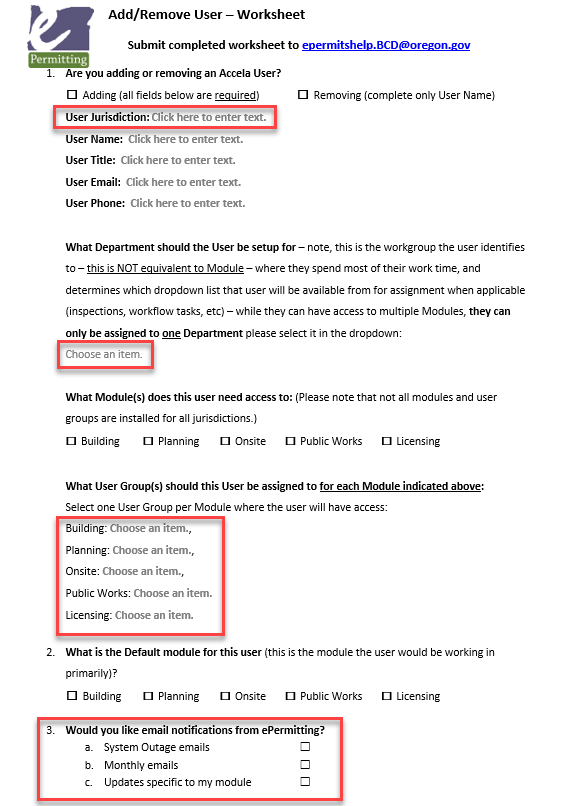 There were some additional updates to the language in the form to help better direct you in what information we are looking for. You can find the new Add/Remove User form, an instructional sheet on how to fill out the form, and the User Group Permissions PDF documents at Adding/Removing User Accounts - Powered by Kayako Help Desk Software. We also wanted to be sure everyone knows that when a user’s account is being disabled, you must also fill out this same Add/Remove User form which includes the removal of any auto-assign if the person is an inspector and to designate the next inspector who should be set up with auto-assign.
We appreciate that everyone uses this important form and hope the updates make the process smoother for everyone. The ePermitting team will start updating the login screen when needed to share news, maintenance alerts, and more. 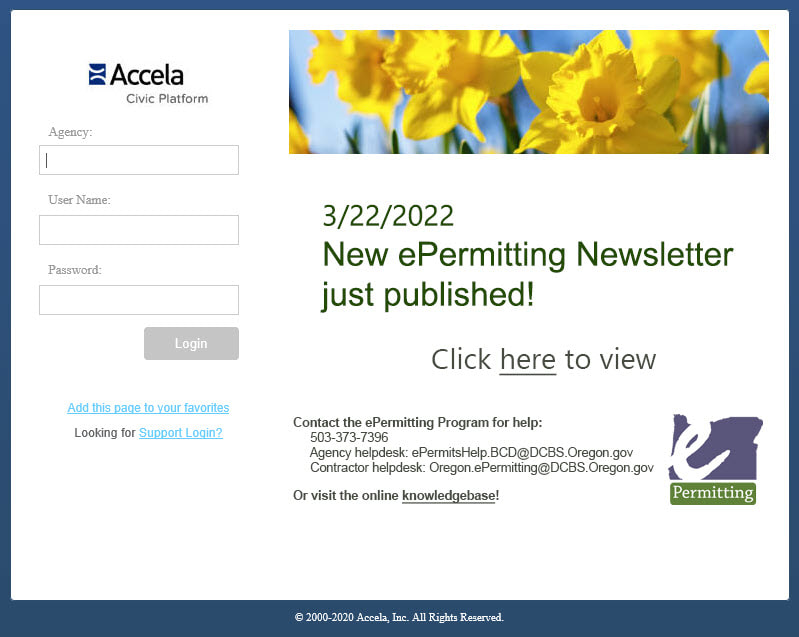 The Valuation (Calculator) tab provided on all building record types would be required in several business cases. The Valuation Calculator would be populated whenever occupancy would need to be granted – when there is new square footage being added (Type or Work = New, Addition), or when the permit is for a Tenant Improvement (Category of Construction = Tenant Improvement, Type of Work = Alteration). The Valuation Calculator tab values are used to populate the Certificate of Occupancy report where Occupancy and Type are requirements. Even if you are not using the Valuation Calculator to determine the fees in reference to valuation rules, the Certificate of Occupancy report still requires it be populated. Note, you are indicating which you are using for fees, Valuation Contractor or Valuation Calculator, using the Fee Calc Factor dropdown on the Fee tab. 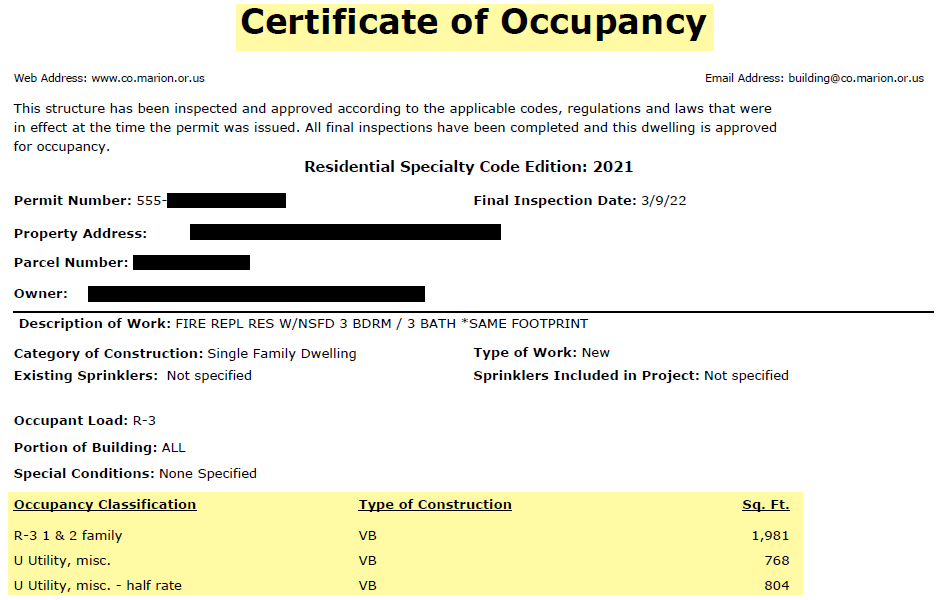 From both the Inspections list page directly and from the Inspections tab on the My Tasks page, there is a View Log button available to most users (there is a certain level of permissions required to have this button display). If you are receiving questions/concerns from customers that they scheduled an inspection and no one came out, or that they scheduled for a certain date that you are not seeing in the system, they say it was scheduled a certain way that didn’t work, and any of the other questions about scheduled inspections that you likely get – you can use the Inspection Log functionality to resolve many of these. Checkbox the inspection in the list, select View Log > Inspection Log – the inspection log details will be displayed in a pop-up window.  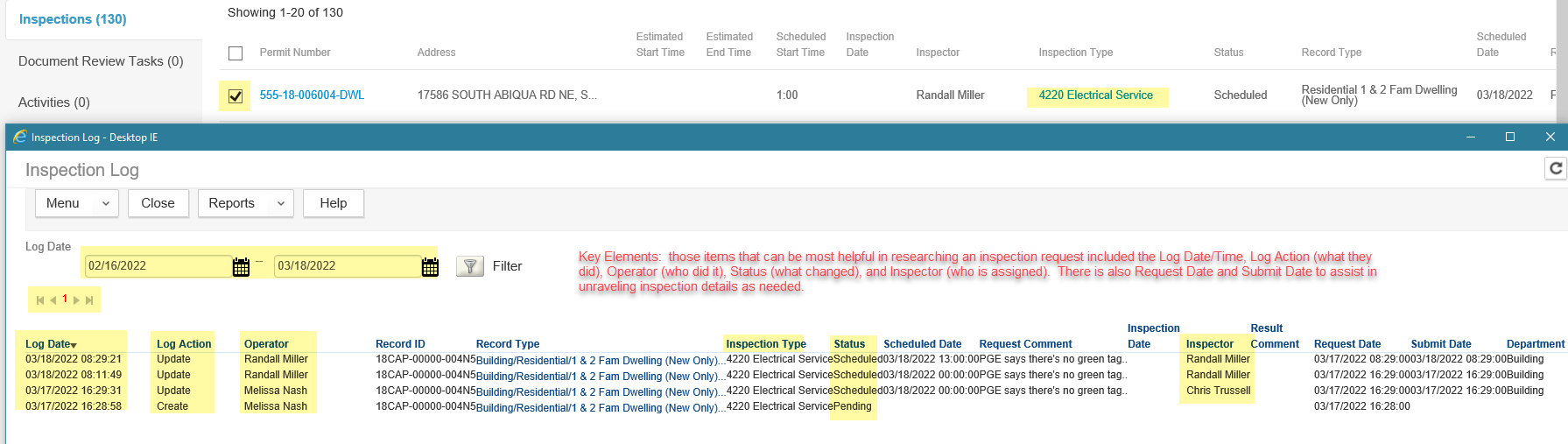  There is a variety of details provided that can greatly assist you in resolving any inspection scheduling issue. We often get calls or helpdesk tickets that are resolved using this same Inspection Log.
If you have any questions on how to use this log, please submit a ticket to the agency helpdesk at epermitshelp.BCD@dcbs.oregon.gov. Important Reminder to all agencies - any time you are increasing fees, adding new fees you have not charged formerly, or adjusting a fee method/calculation in such a way that it results in a fee increase – BCD Fee Notice would be required.
We sometimes receive helpdesk tickets regarding fee increases/changes where the agency has not gone to BCD Fee Notice or was not aware they had to. On this note, submitting fee changes to ePermitting does not fulfill the BCD Fee Notice requirement, it is a separate process that your agency will need to also complete. BCD Fee Notice information is provided at https://www.oregon.gov/bcd/jurisdictions/Pages/proposed-fees.aspx . See the Changing Fees section primarily. We are continuing our pilot program for the video inspection/photo upload features of the Oregon Inspector app.
Thank you to the inspectors and contractors in Deschutes County, who are doing extensive testing of these features! Thus far, it is going well and we expect to start rolling this out to other jurisdictions by May. Our Accela 101 Basics Training has been a big hit the last few months, so we plan to continue them for the next six months. Each weekly training session (3-part series) will be offered to assist agencies who have lost their in-house experts/trainers or are needing a refresher of the basics. We have a lot of agencies that have lost their experts or are dealing with recent or high turnover, so training to ‘hit the ground running’ is now being offered. Submit a ticket to the Kayako helpdesk to request information on the current training schedule and availability. We plan to provide training every week on Tuesdays from 9:30 a.m. to noon.
The Certificate of Occupancy now displays tenant information when the record type is Commercial Structural and there is a contact with Contact type = ‘Tenant’. This is intended for Commercial Structural permits where the Type of Work = ‘Tenant Improvement’. The report will show the name, business name (if available) and address for the first or primary contact type = ‘Tenant’ associated with the permit. Here is the ‘Tenant’ contact information for the Certificate of Occupancy shown below:  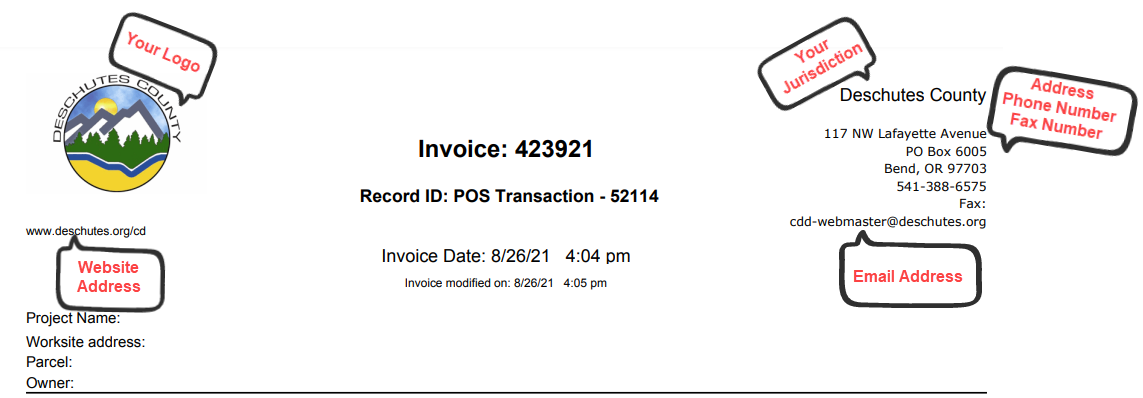 We are installing the newest version of Accela in a test environment this week. The ePermitting team will be testing the new version extensively over the next 6-8 weeks. Once we’ve completed the first round of internal testing, we’ll be upgrading the Config environment where users will have the opportunity to do some testing and exploring of their own for approximately two weeks. We anticipate upgrading the production environment in early June. Along with performance and security enhancements, both Chrome and Edge will now be fully supported. We will be providing you with regular updates and more information in the coming weeks as we progress through our testing.
The February 2022 ICC Building Valuation Data has been loaded into Accela for all agencies and will become effective and available for use on April 1, 2022. On April 1st, you will see that the version dropdown will now appear like the screenshot below, with the new version appearing first in the list and the most recent former version will now appear in the list with a “P-“ proceeding the version number. This change was made last year when we upgraded to our current version of Accela because of the way Accela changed the functionality of this dropdown. 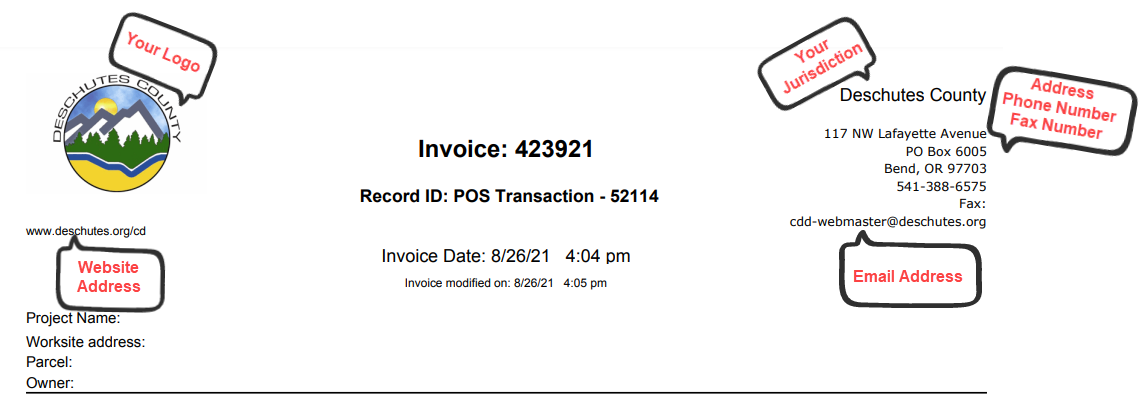
During the pandemic, there has been an increase in electronic plans being submitted online and reviewed electronically. Currently, in ePermitting, customers can upload plans on ACA but the electronic plan review and mark up is happening outside Accela in either Bluebeam or Adobe Acrobat Pro.
ePermitting is interested in providing some enhanced options:
Live Video Inspections, Photo Uploads and More Upgrades Coming to Contractor and Inspector Apps1/17/2022 Over the past six months, the ePermitting team has been working to develop and add new features to both the Oregon Inspector App and the Oregon ePermitting Contractor Scheduling App. New features that we have been testing, allow inspectors to initiate and conduct live video inspections without physically being on the jobsite, as well as allow contractors or homeowners to upload photos directly to their scheduled inspections through the apps. Additionally, the apps will include Push Notifications that can be sent manually by the inspector when there are updates, and automatically when an inspection is resulted or rescheduled. New direct messaging functionality will allow individuals to communicate with the inspector assigned to do their inspection without having to track down contact information. Other tools for the apps that are in development include a menu with submittal instructions/examples for contractors, fillable forms for contractors to access and submit from the field, as well as an offline queue that stores photos uploaded if there is no service available. All of these tools have been the direct result of contractor/inspector feedback and collaboration, and are being added to provide much needed additional flexibility to both contractors and inspectors for both specific and unique business cases. We would like to thank the inspectors and contractors that have assisted us in developing and testing these features from the ground up and look forward to starting our Phase 1 Pilot Program with several other jurisdictions across the state once we finalize the current app upgrades.
Over the next month, the ePermitting team will be reaching out and working with several jurisdictions across the state to train both inspectors and contractors on the new features as part of our Phase 1 Pilot Program. This initial phase will help us ensure that each tool functions properly, and will allow us to work out any issues before finalizing the apps for full release. These apps will be available for both iOS and Android devices when finalized and then will be released statewide. For more information please contact Jerod Broadfoot, ePermitting Outreach and Training Coordinator via email at jerod.a.broadfoot@dcbs.oregon.gov |
DisclaimerPlease be aware that this content is relevant at the time it is published, but as time goes on may become out-of-date. We will do our best to keep the content alive and relevant. Archives
August 2023
Categories
All
|

 RSS Feed